

Introduction
In Week 6, we built rkGetSnapshotCount() to retrieve snapshot statistics across VMware VMs and filesets.
In Week 7, we built rkGetProtectionStatus() to retrieve protection and compliance state per workload.
In Week 8, we introduced rkGetSnapshots(), a reusable PHP helper capable of retrieving the complete recovery-point history of a protected workload.
The function handled the difficult parts for us:
- Building the GraphQL query
- Querying snapshotOfASnappableConnection
- Following cursor-based pagination
- Sorting snapshots from newest to oldest
- Returning a normalized PHP array
A typical call now looks like this:
$snapshots = rkGetSnapshots($workloadId);
The result contains the individual recovery points associated with the workload:
[
    [
        'id'             => 'Snapshot:::12345',
        'date'           => '2026-07-12T02:00:00Z',
        'expirationDate' => '2026-08-12T02:00:00Z'
 ],
    [
        'id'             => 'Snapshot:::12346',
        'date'           => '2026-07-11T02:00:00Z',
        'expirationDate' => '2026-08-11T02:00:00Z'
    ]
]
Retrieving the data is useful, but raw PHP arrays are not particularly convenient for backup administrators.
This week, we build the first complete application on top of the framework.
What We Are Building
The explorer runs from the command line:
php SnapshotExplorer.php \
    --workload-id="YOUR_WORKLOAD_FID" \
    --workload-name="PROD-SQL01" \
    --output="./output"
It produces two files:
output/
├── PROD-SQL01-snapshots.csv
└── PROD-SQL01-snapshots.html
The CSV is suitable for Excel, Power BI, scripting, or compliance evidence packages. The HTML report opens directly in a browser with no web server or external dependencies required.
The application follows a straightforward workflow:
Workload ID
    |
    v
rkGetSnapshots()
    |
    v
Normalized snapshot array
    |
    +----------------------+
    |                      |
    v                      v
CSV export             HTML report
The reporting layer has no knowledge of GraphQL. It works entirely with the normalized array returned by the framework.
Practitioner Tip "Your reporting application should not know anything about OAuth, GraphQL queries, pagination, or API versions. Those concerns belong inside the framework and/or SDK. The application should simply ask for the data it needs and focus on the business problem. That is the difference between writing code that works today and building a framework you will still be using a year from now." |
Project Structure
rsc-php-framework/
├── core/
│   ├── RscFramework.php
│   └── rkGetSnapshots.php
│
├── examples/
│   └── SnapshotExplorer.php
│
└── output/
RscFramework.php contains the authentication and GraphQL execution functionality built during previous weeks. rkGetSnapshots.php contains the snapshot retrieval helper from Week 8. SnapshotExplorer.php is the reporting application built this week.
Preparing the Snapshot Data
Before exporting, we enrich the snapshot array with fields that are useful for reporting. For each snapshot, we calculate a human-readable creation date, a human-readable expiration date, the age of the snapshot, the number of retention days remaining, and whether the snapshot has already expired. The raw GraphQL timestamps remain available alongside the enriched fields.
declare(strict_types=1);
// ----------------------------------------
// Function rkPrepareSnapshotData : Normalize and enrich snapshot data for reporting
// ----------------------------------------
function rkPrepareSnapshotData(array $snapshots): array
{
    $preparedSnapshots = [];
    $currentTime = new DateTimeImmutable('now', new DateTimeZone('UTC'));

    foreach ($snapshots as $snapshot)
    {
        $snapshotDate = null;
        $expirationDate = null;
        if (!empty($snapshot['date']))
        {
            $snapshotDate = new DateTimeImmutable($snapshot['date']);
        }
        if (!empty($snapshot['expirationDate']))
        {
            $expirationDate = new DateTimeImmutable(
                $snapshot['expirationDate']
            );
        }
        $snapshotAgeDays = null;
        $retentionRemainingDays = null;
        $isExpired = false;
        if ($snapshotDate !== null)
        {
            $snapshotAgeDays = (int) $snapshotDate
                ->diff($currentTime)
                ->format('%a');
        }

        if ($expirationDate !== null)
        {
            $isExpired = $expirationDate < $currentTime;
            if (!$isExpired)
            {
                $retentionRemainingDays = (int) $currentTime
                    ->diff($expirationDate)
                    ->format('%a');
            }
            else
            {
                $retentionRemainingDays = 0;
            }
        }
        $preparedSnapshots[] = [
            'id' => $snapshot['id'] ?? '',
            'date' => $snapshot['date'] ?? null,
            'dateFormatted' => $snapshotDate?->format(
                'Y-m-d H:i:s \U\T\C'
            ),
            'expirationDate' => $snapshot['expirationDate'] ?? null,
            'expirationDateFormatted' => $expirationDate?->format(
                'Y-m-d H:i:s \U\T\C'
            ),
            'ageDays' => $snapshotAgeDays,
            'retentionRemainingDays' => $retentionRemainingDays,
            'isExpired' => $isExpired
        ];
    }
    return $preparedSnapshots;
}
Because rkGetSnapshots() returns snapshots in descending order, the first entry represents the newest available recovery point and the final entry represents the oldest.
Practitioner Tip "One of the most valuable things a framework can do is normalize and enrich information returned by the API. Converting timestamps into readable dates, calculating snapshot age, or determining retention status only needs to be done once. Every application built on top of the framework immediately benefits from those improvements without duplicating the same logic."" |
Exporting Snapshots to CSV
CSV remains one of the most practical formats for operational reporting. It opens directly in Excel, imports into Power BI, feeds into scripts, and works as compliance evidence.
The export function is intentionally decoupled from Rubrik Security Cloud. It accepts the prepared PHP array and writes it to disk. The columns are: Snapshot ID, Snapshot Date UTC, Expiration Date UTC, Snapshot Age Days, Retention Remaining Days, and Expired.
// ----------------------------------------
// Function rkExportSnapshotsToCsv : Export normalized snapshot data to a CSV file
// ----------------------------------------
function rkExportSnapshotsToCsv(
    array $snapshots,
    string $filePath
): void
{
    $fileHandle = fopen($filePath, 'wb');
    if ($fileHandle === false)
    {
        throw new RuntimeException(
            "Unable to create CSV file: {$filePath}"
        );
    }
    fputcsv(
        $fileHandle,
        [
            'Snapshot ID',
            'Snapshot Date UTC',
            'Expiration Date UTC',
            'Snapshot Age Days',
            'Retention Remaining Days',
            'Expired'
        ]
    );
    foreach ($snapshots as $snapshot)
    {
        fputcsv(
            $fileHandle,
            [
                $snapshot['id'],
                $snapshot['dateFormatted'] ?? '',
                $snapshot['expirationDateFormatted'] ?? '',
                $snapshot['ageDays'] ?? '',
                $snapshot['retentionRemainingDays'] ?? '',
                $snapshot['isExpired'] ? 'Yes' : 'No'
            ]
        );
    }
    fclose($fileHandle);
}
Example output:
Snapshot ID,Snapshot Date UTC,Expiration Date UTC,Snapshot Age Days,Retention Remaining Days,Expired
Snapshot:::12345,"2026-07-12 02:00:00 UTC","2026-08-12 02:00:00 UTC",2,28,No
Snapshot:::12346,"2026-07-11 02:00:00 UTC","2026-08-11 02:00:00 UTC",3,27,No
Snapshot:::12347,"2026-07-10 02:00:00 UTC","2026-08-10 02:00:00 UTC",4,26,No
Snapshot:::12348,"2026-07-09 02:00:00 UTC","2026-08-09 02:00:00 UTC",5,25,No
Every row represents one recovery point. No additional parsing is required.
Building the HTML Report
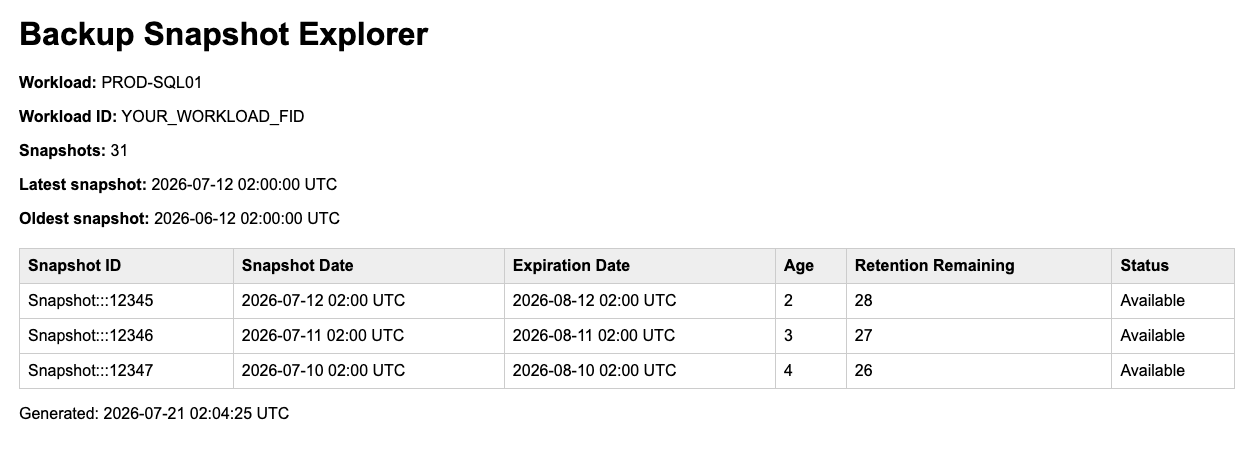
The HTML report exposes the same data in a browser-readable format. It includes the workload name, workload ID, report generation time, total snapshot count, the latest recovery point, the oldest recovery point, and a searchable snapshot table.
The generated document is completely self-contained. It requires no web server, database, JavaScript framework, or external stylesheet.
The escaping helper prevents workload names, snapshot identifiers, or other values from being interpreted as HTML:
// ----------------------------------------
// Function rkEscapeHtml : Safely encode a value for HTML output
// ----------------------------------------
function rkEscapeHtml(mixed $value): string
{
    return htmlspecialchars(
        (string) ($value ?? ''),
        ENT_QUOTES | ENT_SUBSTITUTE,
 'UTF-8'
    );
}
The HTML generation function
The escaping helper prevents workload names, snapshot identifiers, or other values from being interpreted as HTML:
// ----------------------------------------
// Function rkExportSnapshotsToHtml : Export snapshot data to a standalone HTML report
// ----------------------------------------
function rkExportSnapshotsToHtml(
    array $snapshots,
    string $filePath,
    string $workloadName,
    string $workloadId
): void
{
    $generatedAt = gmdate('Y-m-d H:i:s') . ' UTC';
    $snapshotCount = count($snapshots);
    $latestSnapshot = $snapshots[0]['dateFormatted']
        ?? 'Not available';
    $oldestSnapshot = $snapshots[$snapshotCount - 1]['dateFormatted']
        ?? 'Not available';


    $rows = '';
    foreach ($snapshots as $snapshot)
    {
        $status = $snapshot['isExpired']
            ? 'Expired'
            : 'Available';
        $rows .= sprintf(
            '<tr>
                <td>%s</td>
                <td>%s</td>
                <td>%s</td>
                <td>%s</td>
                <td>%s</td>
                <td>%s</td>
            </tr>',
            htmlspecialchars($snapshot['id'] ?? ''),
            htmlspecialchars($snapshot['dateFormatted'] ?? ''),
            htmlspecialchars($snapshot['expirationDateFormatted'] ?? ''),
            htmlspecialchars((string) ($snapshot['ageDays'] ?? '')),
            htmlspecialchars(
                (string) ($snapshot['retentionRemainingDays'] ?? '')
            ),
            $status
        );
    }

    if ($rows === '')
    {
        $rows = '
            <tr>
                <td colspan="6">No snapshots found.</td>
            </tr>
        ';
    }

    $html = sprintf(
        '<!DOCTYPE html>
<html lang="en">
<head>
    <meta charset="UTF-8">
    <title>Backup Snapshot Explorer</title>
    <style>
        body
        {
            font-family: Arial, sans-serif;
            margin: 30px;
        }
        table
        {
            width: 100%%;
            border-collapse: collapse;
            margin-top: 20px;
        }
        th,
        td
        {
            padding: 8px;
            border: 1px solid #cccccc;
            text-align: left;
        }
        th
        {
            background: #eeeeee;
        }
    </style>
</head>
<body>
    <h1>Backup Snapshot Explorer</h1>
    <p><strong>Workload:</strong> %s</p>
    <p><strong>Workload ID:</strong> %s</p>
    <p><strong>Snapshots:</strong> %d</p>
    <p><strong>Latest snapshot:</strong> %s</p>
    <p><strong>Oldest snapshot:</strong> %s</p>

    <table>
        <thead>
            <tr>
                <th>Snapshot ID</th>
                <th>Snapshot Date</th>
                <th>Expiration Date</th>
                <th>Age</th>
                <th>Retention Remaining</th>
                <th>Status</th>
            </tr>
        </thead>
        <tbody>
            %s
        </tbody>
    </table>
    <p>Generated: %s</p>
</body>
</html>',
        htmlspecialchars($workloadName),
        htmlspecialchars($workloadId),
        $snapshotCount,
        htmlspecialchars($latestSnapshot),
        htmlspecialchars($oldestSnapshot),
        $rows,
        $generatedAt
    );
    if (file_put_contents($filePath, $html) === false)
    {
        throw new RuntimeException(
            "Unable to create HTML report: {$filePath}"
        );
    }
}
HTML generation is handled directly in PHP. For a larger application, a templating engine could be introduced, but doing so here would distract from the primary objective: consuming snapshot data returned by the framework.
Creating the Command-Line Application
With all components in place, we combine them into SnapshotExplorer.php
declare(strict_types=1);
require_once __DIR__ . '/../core/RscFramework.php';
require_once __DIR__ . '/../core/rkGetSnapshots.php';
# ----------------------------------------
# Function rkDisplayUsage : Display command-line usage information
# ----------------------------------------
function rkDisplayUsage(): void
{
    echo <<<TEXT
Backup Snapshot Explorer
Usage:
  php SnapshotExplorer.php \
    --workload-id="<FID>" \
    --workload-name="<NAME>" \
    [--output="<DIRECTORY>"] \
    [--max-snapshots=<NUMBER>]
Example:
  php SnapshotExplorer.php \
    --workload-id="YOUR_WORKLOAD_FID" \
    --workload-name="PROD-SQL01" \
    --output="../output" \
    --max-snapshots=500
TEXT;
}
# ----------------------------------------
# Function rkCreateOutputDirectory : Create the report output directory when required
# ----------------------------------------
function rkCreateOutputDirectory(string $directory): void
{
    if (is_dir($directory)) {
        return;
    }
    if (!mkdir($directory, 0750, true) && !is_dir($directory)) {
        throw new RuntimeException(
            "Unable to create output directory: {$directory}"
        );
    }
}
# ----------------------------------------
# Function rkCreateSafeFileName : Convert a workload name into a safe file name
# ----------------------------------------
function rkCreateSafeFileName(string $value): string
{
    $safeValue = preg_replace(
        '/[^a-zA-Z0-9._-]+/',
        '-',
        trim($value)
    );
    $safeValue = trim((string) $safeValue, '-');
    return $safeValue !== '' ? $safeValue : 'workload';
}
$options = getopt(
    '',
    [
        'workload-id:',
        'workload-name:',
        'output::',
        'max-snapshots::',
        'help'
    ]
);
if (isset($options['help'])) {
    rkDisplayUsage();
    exit(0);
}
$workloadId = $options['workload-id'] ?? null;
$workloadName = $options['workload-name'] ?? null;
$outputDirectory = $options['output'] ?? (__DIR__ . '/../output');
$maxSnapshots = isset($options['max-snapshots']) ? (int) $options['max-snapshots'] : 500;
if (
    !is_string($workloadId)
    || trim($workloadId) === ''
    || !is_string($workloadName)
    || trim($workloadName) === ''
) {
    fwrite(
        STDERR,
        "Missing --workload-id or --workload-name.\n\n"
    );
    rkDisplayUsage();
    exit(1);
}
if ($maxSnapshots < 1) {
    fwrite(
        STDERR,
        "--max-snapshots must be greater than zero.\n"
    );
    exit(1);
}
try {
    rkCreateOutputDirectory($outputDirectory);
    echo "Backup Snapshot Explorer\n";
    echo "------------------------\n";
    echo "Workload       : {$workloadName}\n";
    echo "Workload ID    : {$workloadId}\n";
    echo "Snapshot limit : {$maxSnapshots}\n\n";
    echo "Retrieving snapshots from Rubrik Security Cloud...\n";
    $snapshots = rkGetSnapshots(
        $workloadId,
        $maxSnapshots
    );
    $preparedSnapshots = rkPrepareSnapshotData($snapshots);
    $safeWorkloadName = rkCreateSafeFileName($workloadName);
    $csvFilePath = rtrim(
        $outputDirectory,
        DIRECTORY_SEPARATOR
    ) . DIRECTORY_SEPARATOR . $safeWorkloadName . '-snapshots.csv';
    $htmlFilePath = rtrim(
        $outputDirectory,
        DIRECTORY_SEPARATOR
    ) . DIRECTORY_SEPARATOR . $safeWorkloadName . '-snapshots.html';
    rkExportSnapshotsToCsv(
        $preparedSnapshots,
        $csvFilePath
    );
    rkExportSnapshotsToHtml(
        $preparedSnapshots,
        $htmlFilePath,
        $workloadName,
        $workloadId
    );
    $snapshotCount = count($preparedSnapshots);
    $latestSnapshot = $preparedSnapshots[0] ?? null;
    $oldestSnapshot = $preparedSnapshots[$snapshotCount - 1] ?? null;
    echo "\nSnapshot retrieval completed.\n\n";
    echo "Snapshots found : {$snapshotCount}\n";
    echo 'Latest snapshot : ' . ($latestSnapshot['dateFormatted'] ?? 'Not available') . "\n";
    echo 'Oldest snapshot : ' . ($oldestSnapshot['dateFormatted'] ?? 'Not available') . "\n\n";
    echo "CSV report      : {$csvFilePath}\n";
    echo "HTML report     : {$htmlFilePath}\n";
} catch (Throwable $exception) {
    fwrite(
        STDERR,
        'Snapshot Explorer failed: ' . $exception->getMessage() . "\n"
    );
    exit(1);
}rkPrepareSnapshotData(), rkExportSnapshotsToCsv(), rkEscapeHtml(), and rkExportSnapshotsToHtml() can remain inside the example script or be moved into a dedicated reporting library. For the downloadable example, keeping them together makes the execution flow easier to follow.
Running the Explorer
The explorer requires the FID of a VMware virtual machine or fileset. The workload identifiers returned by rkGetProtectionStatus() from Week 7 can be reused directly.
Basic execution:
php examples/SnapshotExplorer.php \
    --workload-id="YOUR_WORKLOAD_FID" \
    --workload-name="PROD-SQL01"
With a larger snapshot limit:
php examples/SnapshotExplorer.php
    --workload-id="YOUR_WORKLOAD_FID" \
    --workload-name="PROD-SQL01" \
    --max-snapshots=1000
With a custom output directory:
php examples/SnapshotExplorer.php \
    --workload-id="YOUR_WORKLOAD_FID" \
    --workload-name="PROD-SQL01" \
    --output="/tmp/rsc-reports"
Practitioner Tip "Up until now, every article has focused on building the framework itself. This week, we are using that framework to build our first real application. That is how successful frameworks evolve. You stop writing API demonstrations and start delivering practical tools that solve real operational problems. From this point forward, every new capability should be another application built on the same solid foundation." |
Example Terminal Output
A successful execution produces:
Backup Snapshot Explorer
------------------------
Workload       : PROD-SQL01
Workload ID    : YOUR_WORKLOAD_FID
Snapshot limit : 500

Retrieving snapshots from Rubrik Security Cloud...

Snapshot retrieval completed.

Snapshots found : 31
Latest snapshot : 2026-07-12 02:00:00 UTC
Oldest snapshot : 2026-06-12 02:00:00 UTC
CSV report      : ./output/PROD-SQL01-snapshots.csv
HTML report     : ./output/PROD-SQL01-snapshots.html
The terminal summary confirms whether retrieval succeeded, how many recovery points were found, the latest and oldest available recovery points, and where the reports were written.
Example HTML Output
The generated HTML page begins with three summary cards:
How the Explorer Works
The complete workflow has five stages.
1. Parse the Command-Line Parameters
The application reads the workload FID, workload display name, maximum snapshot count, and output directory. The workload name is used only for display and file naming. The FID is the value passed to Rubrik Security Cloud.
2. Retrieve Snapshot History
$snapshots = rkGetSnapshots(
    $workloadId,
    $maxSnapshots
);
Authentication, GraphQL execution, and pagination remain inside the framework. The explorer does not construct or execute a GraphQL query.
3. Enrich the Data
rkPrepareSnapshotData() converts ISO 8601 timestamps into readable UTC dates and calculates snapshot age, retention remaining, and expiration state. The original values remain available for further automation.
4. Export the Reports
The same normalized array is passed to both output functions:
rkExportSnapshotsToCsv(...);
rkExportSnapshotsToHtml(...);
Both reports contain consistent information because they draw from the same source array.
5. Display the Summary
The application displays snapshot count and the newest and oldest recovery points in the terminal. No additional API request is required because all information already exists in the returned array.
VMware VMs and Filesets
The explorer does not require separate reporting logic for VMware VMs and filesets. Both workload types are identified by a FID, and rkGetSnapshots() returns the same normalized snapshot structure for both. Once the FID is known, the reporting process is identical:
$snapshots = rkGetSnapshots($workloadId);This is precisely why normalizing API responses inside the framework matters. The reporting application carries no workload-specific GraphQL logic.
Handling Empty Snapshot Collections
A valid workload does not necessarily have available snapshots. Possible reasons include: the workload was recently protected and no successful backup has completed yet, all recovery points have expired, the wrong FID was supplied, or the service account does not have access to the requested workload.
When no snapshots are returned, the CSV contains only its header row and the HTML report displays: No snapshots were returned for this workload.
The application completes successfully because an empty collection is a valid API result. Authentication errors, GraphQL errors, invalid directories, and file-writing failures are treated as execution failures and return a non-zero exit code.
Commit of the Week
/examples/SnapshotExplorer.php
/examples/output/PROD-SQL01-snapshots.csv
/examples/output/PROD-SQL01-snapshots.html
The primary deliverable is the Snapshot Explorer application. rkGetSnapshots() was introduced in Week 8 and is being reused exactly as intended.
What This Week Really Delivers
In Week 8, we built the ability to retrieve individual recovery points from RSC. This week, we turned that data into a practical reporting tool.
The Snapshot Explorer demonstrates something that matters more than any individual function: that the helpers built throughout this series compose into complete operational applications. The reporting layer knows nothing about GraphQL, pagination, or authentication. It asks for data and formats it. That separation is what a real framework delivers.
The framework is no longer a collection of GraphQL examples. It is a PHP toolkit for reporting on and interacting with Rubrik Security Cloud.
What's Next
The Snapshot Explorer makes recovery point history easy to review. But it still requires an administrator to interpret what the data means.
A report showing that the latest snapshot is 48 hours old is useful. It does not tell you whether that workload is healthy, overdue, or operating exactly as expected.
In Week 10, we add that interpretation. Using the snapshot data already returned by rkGetSnapshots(), we will calculate operational indicators: the age of the latest recovery point, expected backup frequency, missing or overdue backups, unexpected gaps between snapshots, and workloads that may require attention before they become recovery problems.
The framework will stop collecting backup information and start evaluating it.
Contributed by

Frederic Lhoest
Senior Technology Architect, PCCW Global

Mike Preston
Staff Technical Marketing Manager, Rubrik


