

Introduction
Let’s be real: the old days of just building up your perimeter are gone. Now, identity sits at the centre of everything - users, non-human identities (NHIs), apps, SaaS, and third parties - and over 90% of big breaches start with stolen credentials, not by breaking down the door but by simply walking right in.
Microsoft Active Directory (AD) and Entra ID (Azure AD) are the keys to the kingdom. If your identity service is unavailable, or compromised, or not reachable, the impact is catastrophic.
“If Active Directory or Entra ID were down for several days, what would the business impact look like?”
“When did the 'Configuration Drift' actually start? ”
“How quickly can you recover your Active Directory and how many manual steps does your team follow to recover AD after an outage?”
What an AD breach looks like
An attacker has broken into your Domain Controller (DC) and retrieved your NTDS.DIT database. They are using a forged Golden Ticket (forged Kerberos TGT) to retain persistent access, impersonate any user in your network, and gain entry to sensitive data and computers.
Based on the Golden Ticket scenario that was described above, "The attack is silent, often weeks before any alarm bells ring."
An attacker compromises the low-level service account, such as a printer and/or backup service, and uses that account for mapping the network without setting off the alarm bells. Using the "Kerberoasting" or "DCSync" vulnerability, the attacker steals the KRBTGT hash, the "Crown Jewels" of your identity infrastructure. "With that, the attacker creates a 'Golden Ticket'—a master key that gives access to every resource on your domain, and they have it all for the length of time that key is valid, and they don’t have to hack again; they just have to authenticate again and again and again."
They create back-doored "Admin" accounts deep within outdated Organisational Units (OUs) within your domain that your staff hasn’t looked at in years, and they basically become the "Ghost Admins" of your domain.
The Ops and Security teams' moment of realisation isn’t about a warning light turning red but rather a paralysing blackout. The attack begins with a few help desk tickets for login failures but quickly escalates as your Senior Admins try to troubleshoot and discover their login credentials are denied. They try to access your Domain Controllers to change their password but find themselves locked out of their own systems. A sense of panic builds as you come to realise that "the truth about your network" is merely a rewriting of your reality as you realize you cannot trust any of your users, logs, or systems because your attacker is simulating legitimate system traffic. The system is no longer merely broken but deliberately turned against you with any and every move you try to regain control thwarted by your attacker with higher privilege levels.
At this stage, it is no longer a question of how one can stop them but how quickly a reliable AD can be reconstructed in order to integrate the company's ventures into it.
Why AD recovery is so painful today
Current State:
- AD Protection: Relying only on software-level backup results in long recovery times, often tied to a 150-page manual.
- VM-Level Risks: Only having a VM-level backup results in high data loss and long dwell times.
- Entra ID Protection: Frequently relies on the recycle bin due to a misunderstanding of the shared responsibility model.
- The Provider Gap: Most providers are point solutions using full-trust architectures susceptible to attacks; however, forest-level AD protection is necessary.
Typically, most teams mistakenly believe they can restore their Active Directory environment; however, the reality is it is very slow and manual in nature, meaning it is never practiced but instead requires the use of large 150-page books during an emergency situation. The result is significant data loss and prolonged downtime. Most teams rely on VM-level backups and the Entra ID recycle bin as a fallback, but these only provide partial coverage since forest-level protection is where these security measures need to be enabled.
AD recovery at a glance
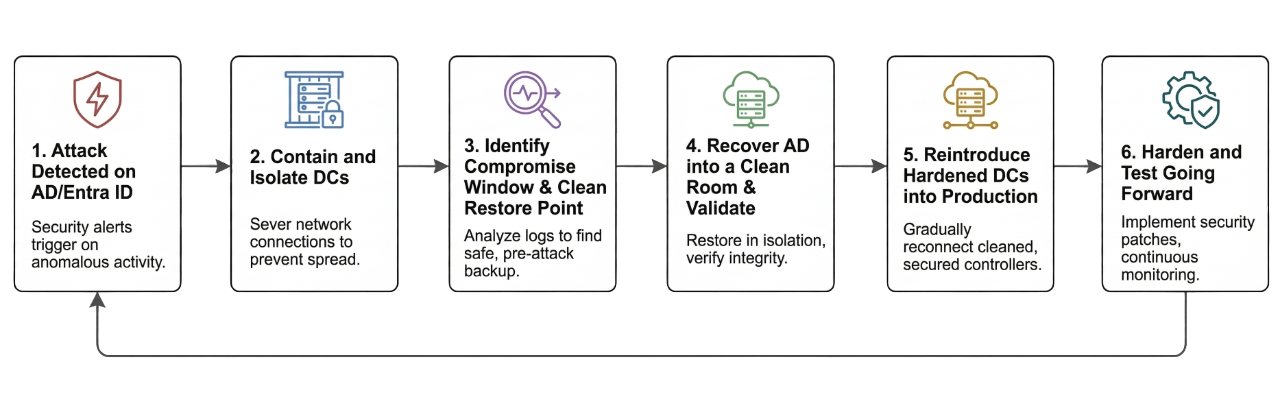
- Attack detected on AD/Entra ID
- Contain and isolate DCs
- Identify compromise window and clean restore point
- Recover AD into a clean room and validate
- Reintroduce hardened DCs into production
- Harden and test going forward
“This is the path from ‘we just discovered a Golden Ticket’ to ‘we trust our identity plane again.’ The sections below walk through each phase.”
The AD recovery runbook
Phase 1: Contain the blast radius (T + 0 to T + 30 minutes)
- What you do: Immediately shut down or isolate all impacted Domain Controllers and identity infrastructure to prevent further malicious replication. Move key recovery personnel to a dedicated out-of-band communication channel.
- Why it matters: This prevents attacker persistence (via stolen email) from undermining the recovery process.
- Where Rubrik helps: Rubrik backups are immutable and logically air-gapped by default, so taking the step to isolate does not diminish the ability to restore.
Phase 2: Find a clean restore point (T + 30 minutes to T + 2 hours)
- What you do: Review security logs to identify signs of compromise. Identify the system state and NTDS.DIT clean backup collected just before that window. Create a separate "Clean Room" with no network connectivity to production.
- Why it matters: This ensures you are not restoring a dormant threat.
- Where Rubrik helps: Rubrik’s Threat monitoring looks at backup history for anomalies to match the attack timeline. It provides instant access to mount the clean backup into the Clean Room for testing.
Phase 3: Rebuild trusted identity (T + 2 hours to T + 6 hours)
- What you do: Upload a verified, clean version of AD into the Clean Room. Perform a forced reset of the KRBTGT password and administrative accounts. Reintroduce the hardened DC back into production and execute a mandatory global password reset.
- Why it matters: This guarantees the termination of the attacker’s ability to persist.
- Where Rubrik helps: Rubrik allows for granular restoration of System State, NTDS.DIT, and Sysvol, removing the risk of a forest-wide rebuild.
Phase 4: Harden and test going forward
- What you do: Perform a comprehensive audit of access and privileges for service accounts. Schedule formal exercises to test the recovery runbook.
- Why it matters: You reduce the blast radius and ensure RTOs can be met in the future.
- Where Rubrik helps: Rubrik’s Data Security Posture Management (DSPM) identifies which identities have excessive or risky access to sensitive data.
Making AD recovery predictable
- Orchestrated Recovery: Shifts from a slow manual reaction to rapid automated resilience via "Blueprints".
- Guaranteed Survivability: Once data is written to Rubrik Secure Vault, it cannot be modified or encrypted by unauthorized actors.
- Native Backups: Uses wbadmin for system state backups to ensure application consistency.
- Rapid Metadata: UMD indexes enable rapid querying of users and groups without mounting the production AD.
- Hybrid Protection: Single-platform protection for both AD and Entra ID, including enterprise apps and conditional access rules.
The Bottomline
Don't let a compromised identity be a business-killer event. With Rubrik, make your "key to the kingdom" a most powerful defensive tool, and a guarantee that attackers may gain access, but your business will still be up and running.
In a world where bad actors don’t break in, they log in, standard security measures alone are insufficient. With Rubrik Identity Resilience, you are granted the ability to see through the breach and recover the unrecoverable, securing your Active Directory and Entra ID from the inside out.
Contributed by

Vikas Sharma
Global Solution Architect, Rubrik

