
Introduction
In Week 9, we built the Snapshot Explorer, a command-line application that retrieves snapshot history and exports it as CSV and HTML reports.
In Week 8, we built rkGetSnapshots() to retrieve the complete recovery-point history of a protected workload with cursor-based pagination.
In Week 7, we built rkGetProtectionStatus() to retrieve protection and compliance state per workload.
After a short summer break, it's time to get back to our Rubrik Security Cloud automation journey and continue building on the framework we left at the end of Week 9.
Over the past nine articles, we've progressively built a reusable PHP framework capable of communicating with Rubrik Security Cloud through GraphQL.
Our framework can now:
- Authenticate using OAuth2
- Execute GraphQL queries
- Retrieve SLA Domains
- Discover protected workloads
- Analyze protection status
- Retrieve snapshot history
- Calculate snapshot age
- Generate HTML and CSV operational reports
By this point, we've transformed our project from a simple API demonstration into a practical reporting framework.
However, every operation we've performed so far shares one important characteristic: they are all GraphQL queries.
Queries allow us to retrieve information, but they never modify anything inside Rubrik Security Cloud.
Eventually, every automation project reaches the same turning point: reading information is no longer enough.
Real-world automation often requires performing actions directly from code:
- Triggering an on-demand backup
- Launching a restore
- Starting recovery operations
- Managing workloads
- Executing administrative tasks
GraphQL performs these actions through mutations.
This week, we'll introduce the mutation model used throughout Rubrik Security Cloud and implement our first reusable helper: rkTriggerSnapshot().
Rather than trying to cover every available mutation, we'll learn the underlying concepts by implementing one of the most useful operational actions: triggering an on-demand snapshot.
This represents an important milestone in our framework's evolution. For the first time, our code will actively interact with Rubrik Security Cloud instead of simply observing it.
Understanding GraphQL Mutations
If you've followed the series from Week 1, you've already become familiar with GraphQL queries.
A typical query looks like this:
query
{
    slaDomains
    {
        nodes
        {
            id
            name
        }
    }
}
Its purpose is simple: ask Rubrik Security Cloud for information and receive data in return.
A mutation follows a very similar structure, but its intent is completely different. Instead of retrieving data, it asks Rubrik Security Cloud to perform an operation.
At its simplest, the structure looks like this:
mutation
{
    ...
}
Conceptually, the difference is straightforward. This distinction is one of the strengths of GraphQL.
Queries and mutations use very similar syntax, so once you're comfortable building GraphQL queries, moving to mutations is a relatively natural progression.
The important difference isn't really the syntax. It's the impact of the operation.
Why Mutations Matter
Most organizations begin their automation journey by collecting information. Typical questions include:
- Which workloads are protected?
- Which snapshots are available?
- Are backups compliant?
- Which systems require attention?
That's exactly what we've been building throughout the previous weeks.
Eventually, however, reporting becomes only part of the solution.
Imagine the reporting workflow we built in Week 9 identifies a virtual machine whose latest recovery point is older than expected. We can report it. We can highlight it. We can export it to CSV.
But wouldn't it be more useful if our automation could also take action? For example, it could trigger an on-demand snapshot for that workload.
This is exactly where mutations become valuable. Instead of stopping after the analysis phase, our framework can begin performing operational actions based on the information it has collected.
That transition from observation to automation is the next major step in our project.
Anatomy of a Mutation
Although mutations perform actions, their structure closely resembles the queries we've already written.
A mutation generally involves three important elements:
- Variables
- An input object
- Returned data
Conceptually, the workflow looks like this:
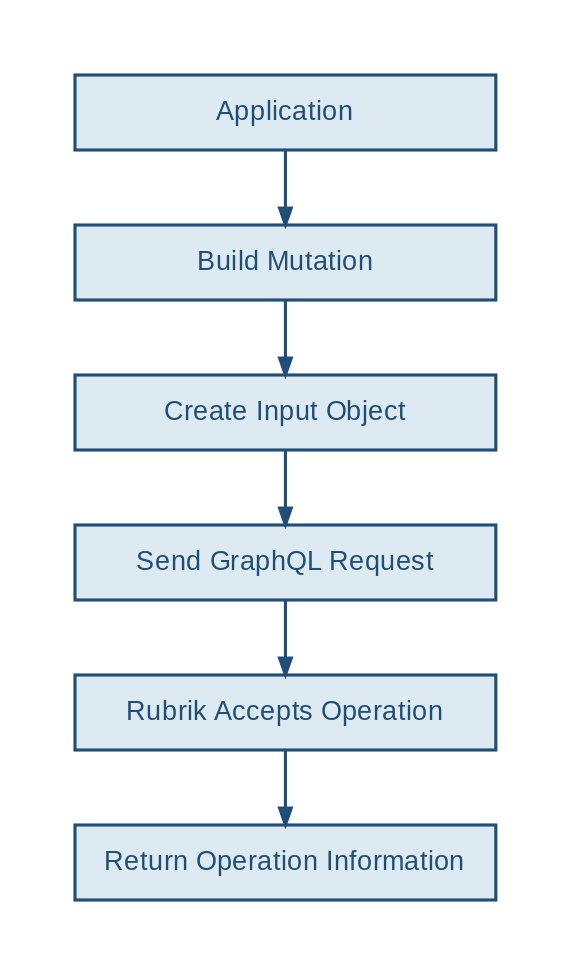
Unlike REST APIs, where different actions are often exposed through different URLs and HTTP methods, our GraphQL operations continue to use the same Rubrik Security Cloud GraphQL endpoint. The GraphQL document itself determines which operation should be executed.
This means our existing framework already provides most of the plumbing we need. Authentication remains the same. The GraphQL endpoint remains the same. Our JSON request handling remains the same.
What changes is the operation we're asking Rubrik Security Cloud to perform.
Triggering an On-Demand Snapshot
For our first mutation, we'll implement one of the most common backup operations: triggering an on-demand snapshot.
For this example, we'll work with a VMware vSphere virtual machine.
The mutation looks like this:
mutation TriggerVsphereSnapshot(
    $input: VsphereOnDemandSnapshotInput!
)
{
    vsphereOnDemandSnapshot(
        input: $input
    )
    {
        id
        status
    }
}
There are a few important differences compared with the queries we've used so far.
First, the mutation expects an input variable:
$input: VsphereOnDemandSnapshotInput!Our PHP code will dynamically construct that input object. For example:
$input = [
    'id' => $workloadId
];
If we want to explicitly provide an SLA Domain, we can extend the input:
$input = [
    'id' => $workloadId,
    'config' => [
        'slaId' => $slaId
    ]
];
We then pass it to GraphQL as a variable:
$variables = [
    'input' => $input
];
This is an important pattern to understand because we'll reuse it for many future mutations. The GraphQL document describes what operation should be performed, while the variables describe which objects and parameters should be used.
Creating a Reusable Helper
As we've done throughout this series, we don't want to embed GraphQL operations directly into every application. Instead, we'll encapsulate the logic inside another reusable helper: rkTriggerSnapshot().
Its responsibilities are straightforward:
- Load the mutation
- Build the GraphQL variables
- Submit the request
- Validate the response
- Handle GraphQL errors
- Return the asynchronous request information
From the caller's perspective, triggering a snapshot becomes simple:
$result = rkTriggerSnapshot(
    $workloadId,
    $slaId
);
The helper takes care of everything else.
This keeps our application code clean and, more importantly, continues the design principle we've followed since the beginning of the series: applications should consume the framework rather than reimplement the API logic.
Using the Updated Framework
This week also introduces an important internal improvement.
Until now, our framework has primarily been used to execute GraphQL queries. But from Rubrik Security Cloud's perspective, queries and mutations are both GraphQL operations sent to the same endpoint. Our generic GraphQL function can therefore execute both.
For example:
$response = rkExecuteGraphQL(
    $query,
    $variables,
    $operationName
);
We can also store our GraphQL operations in separate files and execute them through the framework:
$response = rkExecuteGraphQLFile(
    $graphqlFile,
    $variables,
    $operationName
);
This allows us to keep the responsibilities clearly separated:
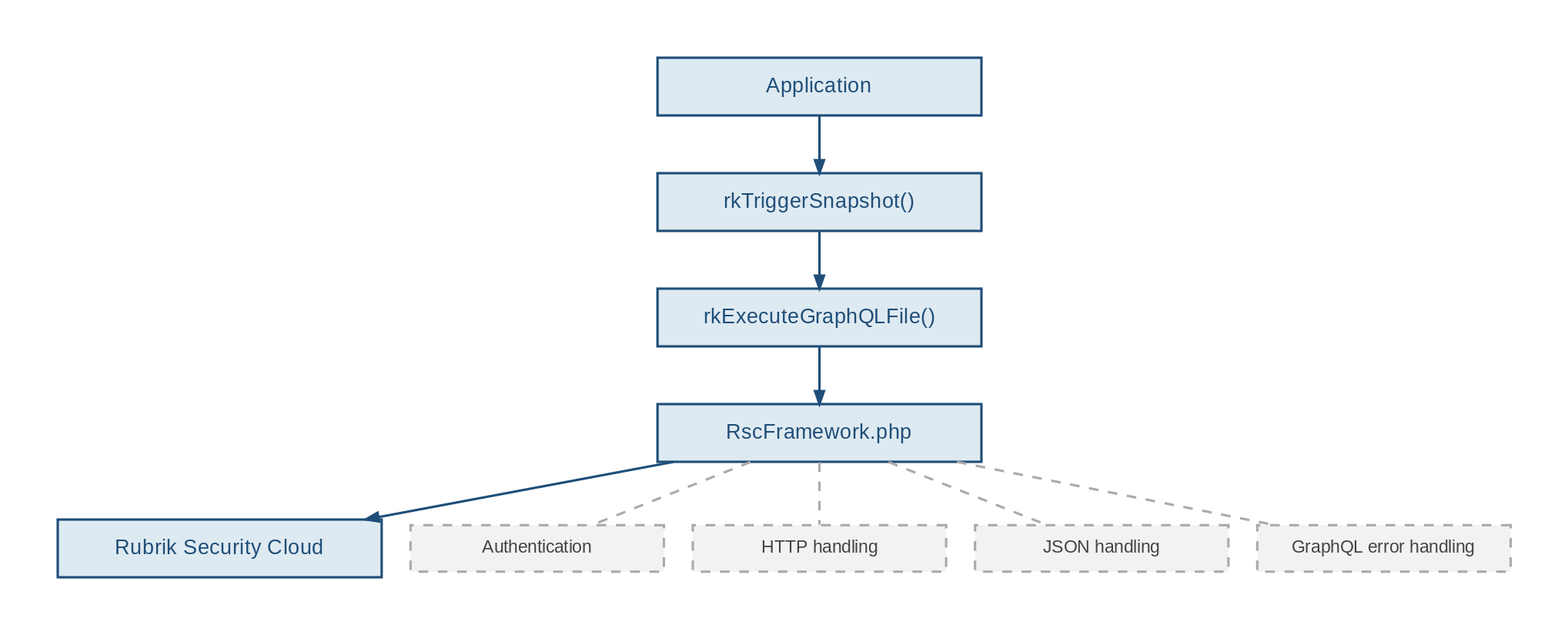
As the framework grows, this separation becomes increasingly important.
Executing Our First Mutation
With the helper in place, triggering an on-demand snapshot becomes straightforward.
For example:
$result = rkTriggerSnapshot(
    $workloadId,
    $slaId
);
A successful result might look like this:
Rubrik On-Demand Snapshot
-------------------------

Workload    : PROD-SQL01
Workload ID : a8fd8809-bbdb-5a03-8663-1c1feb19791c
SLA ID      : def96ac0-be74-5e59-87e2-5af73b65ac1e

Submitting snapshot request...

Snapshot request accepted.

Request ID : d4822e3d-c6e3-4bbe-950e-3e63c4770a78
Status     : QUEUED
And that's where something interesting happens. Our application has successfully triggered the snapshot, but the snapshot isn't necessarily finished.
A Different Kind of Response
One aspect of mutations can be surprising when you first start building operational automation.
When we trigger a snapshot, Rubrik Security Cloud does not wait for the entire backup operation to complete before returning control to our application. Instead, the operation is asynchronous.
Conceptually, the workflow becomes:
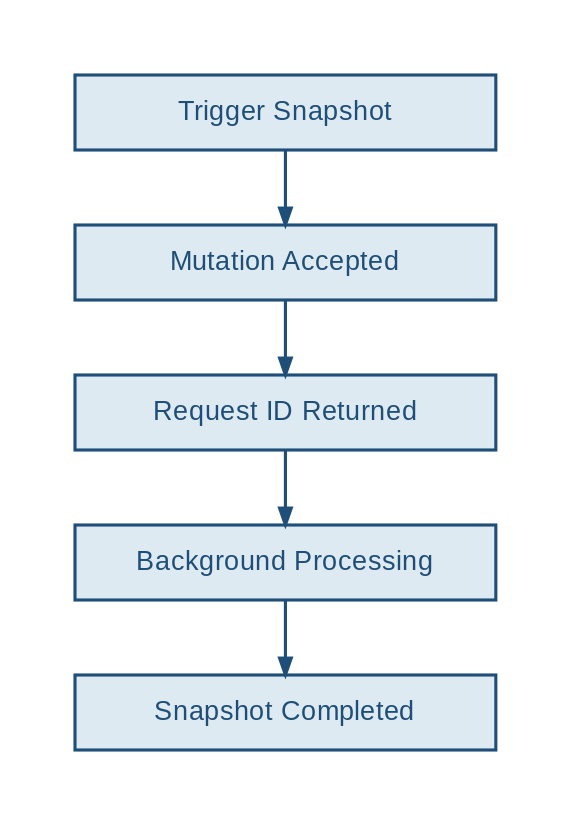
The mutation gives us two particularly useful pieces of information: id and status.
The id identifies the asynchronous request. The status tells us its initial state. That request ID becomes extremely important because we'll need it to follow the operation after the mutation has returned.
Receiving a successful mutation response therefore means: Rubrik Security Cloud accepted our request. It does not necessarily mean: the requested operation completed successfully.
That distinction is fundamental when building reliable automation.
Practitioner Tip "Think of a mutation as submitting a work order rather than completing the work itself. A successful GraphQL mutation confirms that Rubrik Security Cloud has accepted the request. The actual operation often continues in the background. Designing your automation around this asynchronous model from the start will save you from hard-to-debug issues later." |
Error Handling Becomes Even More Important
We've already implemented error handling for our GraphQL queries, but mutations raise the stakes.
A failed query generally means we couldn't retrieve some information. A failed mutation means an operation we intended to perform may not have happened.
Common situations may include:
- Invalid workload identifiers
- Insufficient permissions
- Unsupported workload types
- Invalid mutation parameters
- Operational conflicts
- API or connectivity failures
Our helper should therefore never assume success simply because an HTTP request completed. The framework validates both the HTTP response and any GraphQL errors before returning the result to the calling application.
For example:
try
{
    $result = rkTriggerSnapshot(
        $workloadId,
        $slaId
    );

    echo "Snapshot request accepted.\n";
    echo "Request ID: "
        . $result['requestId']
        . "\n";
}
catch (Throwable $exception)
{
    echo "Snapshot request failed: "
        . $exception->getMessage()
   . "\n";
}
This gives the calling application control over what happens next instead of terminating the entire workflow inside the helper. As our framework evolves toward automation, that distinction becomes increasingly important.
A Small Safety Improvement
There is another difference between the tools we've built previously and what we're building this week.
Running our Week 9 reporting application repeatedly has no operational impact on the protected workload. Running a mutation repeatedly potentially does.
For this reason, our example CLI application includes an explicit confirmation before triggering the snapshot.
You are about to trigger an on-demand snapshot.

Workload    : PROD-SQL01
Workload ID : a8fd8809-bbdb-5a03-8663-1c1feb19791c

Enter YES to continue:
This isn't technically required by GraphQL. It's an application-level safeguard. And it's a useful reminder of an important principle: once automation can change things, safety needs to become part of the design.
Practitioner Tip "Read-only automation and operational automation should not be treated the same way. When a script can trigger backups, restores, or other changes, add safeguards at the application layer: validate your inputs, make the target workload visible, and require confirmation where appropriate. A brief confirmation prompt is a small investment that prevents costly mistakes." |
Preparing for Job Monitoring
At this point, we've successfully crossed an important boundary.
Our framework can now:
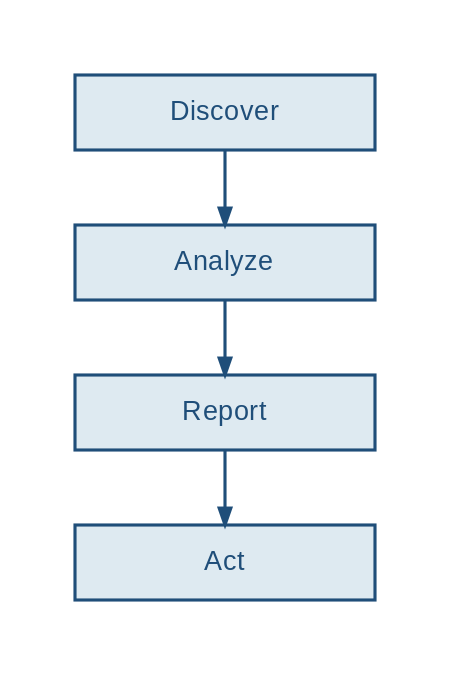
But there is still one missing piece. After we trigger the snapshot, our application receives an asynchronous request ID and then exits. It doesn't yet know whether the snapshot:
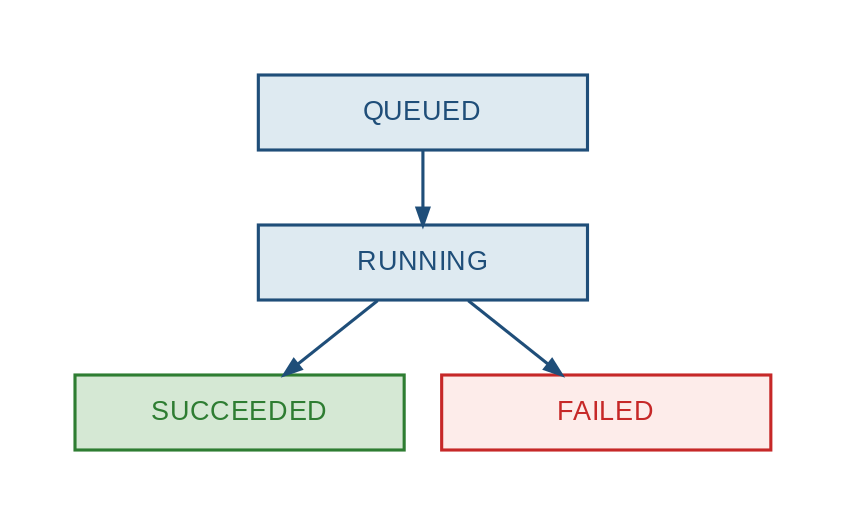
For a human administrator, opening Rubrik Security Cloud and checking the operation manually might be acceptable. For automation, it isn't.
Our framework needs to be able to follow the operation itself. And that brings us directly to Week 11.
Commit of the Week
graphql/
└── mutation_vsphereOnDemandSnapshot.graphql

core/
└── rkTriggerSnapshot.php
└── RscFramework.php

examples/
└── TriggerSnapshot.php
The updated framework also provides generic GraphQL execution functions that can be reused for both queries and mutations.
What This Week Really Delivers
At the end of Week 9, our framework could analyze snapshot information and turn it into an operational report. At the end of Week 10, it can take the next step and perform an operational action inside Rubrik Security Cloud.
The framework can now:
- Understand the GraphQL mutation model
- Build mutation input objects
- Execute GraphQL mutations
- Trigger an on-demand snapshot
- Handle mutation responses and errors
- Retrieve an asynchronous request ID
- Apply basic safeguards to operational actions
- Prepare for asynchronous job monitoring
This may look like a relatively small addition to our codebase. Architecturally, however, it's a major change. For nine weeks, we've been asking Rubrik Security Cloud questions. Now we're starting to tell it what to do.
What's Next
This week introduced one of the most important concepts in our GraphQL automation journey. Until now, every helper in our framework focused on retrieving and analyzing information from Rubrik Security Cloud. Starting today, our framework can actively perform operations.
But triggering an action is only half of the automation story. Since operations such as on-demand snapshots execute asynchronously, we need a reliable way to determine what happens after the request has been accepted.
In Week 11, we'll use the request information returned by our mutation to build reusable job-monitoring capabilities. We'll learn how to:
- Retrieve asynchronous operation status
- Track an operation while it is running
- Detect successful completion
- Detect failures
- Handle timeouts
- Wait programmatically for an operation to finish
That will allow us to evolve from triggering an operation to a complete workflow:
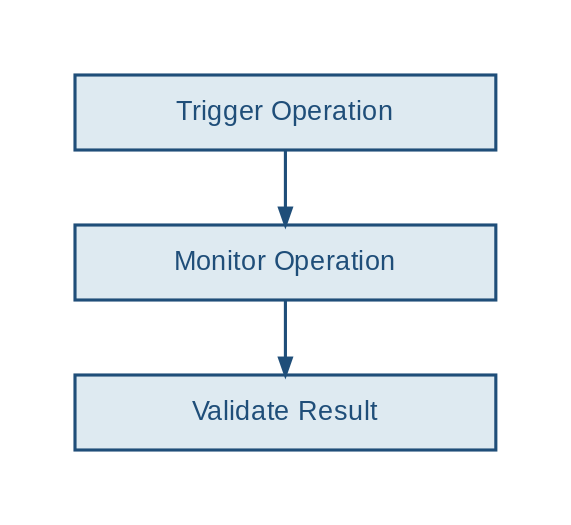
And once we can discover, analyze, report, act, and validate, we'll have all the building blocks required for Week 12. That's where everything we've built throughout this series will finally come together.
Contributed by

Frederic Lhoest
Senior Technology Architect, PCCW Global

Mike Preston
Staff Technical Marketing Manager, Rubrik


