

Introduction
Here we are at Week 12! The final article in this series.
Back in Week 1, I started this journey with a simple idea: revive the PHP framework I originally created around the Rubrik REST APIs and rebuild it for the Rubrik Security Cloud and GraphQL era.
The plan was to start small and progressively create something reusable.
And that is exactly what we did.
Over the previous eleven articles, we moved from authentication to GraphQL queries, from queries to reusable helpers, from protection information to snapshots and reporting, and finally from simply reading data to triggering and monitoring operations.
At the end of Week 11, I also made one final promise: bring those pieces together into an interactive restore workflow.
So for this last article, rather than choosing between the original Week 1 objective and the promise made inWeek 11, we are going to do both.
We will complete the framework with a VMware restore workflow, build a small Restore Portal, package the public files properly, and prepare the RSC PHP Framework v2.0 release.
Let's finish what we started.
The source is available at github.com/flhoest/graphql-rsc.
From Week 1 to Week 12
Looking back, the progression of the series makes much more sense than it probably did when we started. Each week solved another part of the problem.
The first weeks established the foundations: OAuth2 service-account authentication, GraphQL communication, pagination, and reusable PHP functions.
We then started retrieving useful operational information from Rubrik Security Cloud: SLA Domains, snapshot counts, protection status, and complete snapshot history.
By Week 9, those individual building blocks were already powerful enough to create our first real application: the Backup Snapshot Explorer.
Then something important changed. In Week 10, we introduced GraphQL mutations. The framework was no longer limited to retrieving information. It could now ask Rubrik Security Cloud to take action.
And because those actions can run asynchronously, Week 11 introduced rkGetRequestStatus() and rkWaitForRequest().
The framework could now retrieve information, take action, and monitor the result. Only one thing was missing: putting all of that together.
A Roadmap Evolves
There is something interesting when I compare the original Week 1 roadmap with where we ended up.
Week 1 said that Week 12 would be about releasing the new framework. It also imagined several applications that could eventually be built on top of it, including a Snapshot and Restore Portal, a Compliance Dashboard, and automation tools.
Eleven articles later, the framework had started producing exactly those kinds of applications.
Then, at the end of Week 11, I made the objective for the final article even more specific: build an interactive Restore Portal.
There is a small difference between the Week 1 roadmap and the Week 11 promise. Fortunately, we do not need to choose between them.
Week 12 completes a basic Restore Portal and packages the common framework underneath it.
In hindsight, that feels like a better ending.
One Final Capability: Restore
Most of what the Restore Portal needs already exists.
We know how to authenticate. We know how to execute GraphQL operations. We know how to discover VMware workloads, retrieve snapshots, and monitor asynchronous requests.
For Week 12, we connect those capabilities and add the recovery operation.
The new helper is rkRestoreVm().
For this example, we use VMware in-place recovery. The operator selects a VM and one of its available recovery points, and the framework prepares or submits a request to recover that VM from the selected snapshot.
Because in-place recovery can overwrite the VM's existing disks, this is a real and potentially destructive operation. That is why the framework starts in dry-run mode and why a live restore must be tested with a non-production workload before broader use.
The GraphQL Mutation
Just as we did in Week 10, the GraphQL operation remains separate from the PHP code.
The mutation is stored in graphql/mutation_vsphereVmInitiateInPlaceRecovery.graphql:
mutation RestoreVsphereVm(
    $input: VsphereVmInitiateInPlaceRecoveryInput!
)
{
    vsphereVmInitiateInPlaceRecovery(
        input: $input
    )
    {
        id
        status
        startTime
        endTime
 progress
        error
        {
            message
        }
    }
}
The mutation accepts VsphereVmInitiateInPlaceRecoveryInput. The input fields used by the framework were checked through read-only RSC GraphQL schema introspection:
$variables = [
    'input' => [
        'id' => $vmId,
        'config' => [
            'requiredRecoveryParameters' => [
                'snapshotId' => $snapshotId
            ]
        ]
    ]
];
The selected VM FID identifies what we want to recover. The selected snapshot ID identifies where in time we want to recover it from.
The mutation returns an asynchronous request object. In live mode, the returned request ID becomes the link to monitoring.
Wrapping It in rkRestoreVm()
As throughout the series, I do not want the application itself to know how the GraphQL operation works.
The portal calls one helper:
$restore = rkRestoreVm(
    $vmId,
    $snapshotId,
    $clusterUuid
);
rkRestoreVm() validates the values, loads the mutation file, prepares the variables, and reads the local restore_dry_run setting.
When dry run is enabled, the helper returns the exact mutation and variables without contacting the mutation endpoint:
[
    'dryRun' => true,
    'requestSubmitted' => false,
    'requestId' => null,
    'status' => 'DRY_RUN'
]
When live mode is explicitly enabled, the helper uses the existing rkExecuteGraphQLFile() runtime and returns a request ID after RSC accepts the operation:
[
    'dryRun' => false,
    'requestSubmitted' => true,
    'requestId' => 'REQUEST_ID_FROM_RSC',
    'status' => 'QUEUED'
]
There should be very little surprise in this function by now. And that is a good thing.
Almost everything rkRestoreVm() depends on was built earlier in the series. That is exactly what we wanted to achieve after twelve articles.
Dry Run First
The framework's default is deliberately conservative:
'restore_dry_run' => trueIn dry-run mode, the portal shows the complete GraphQL mutation and its variables on the final page. This gives an operator a simple way to review the exact VM and recovery point that would be submitted.
No mutation is sent. No request ID is created. No disks are changed.
To deliberately enable live in-place recovery, update the local configuration file, not the public example:
'restore_dry_run' => falseThat single setting is the difference between previewing a request and submitting it.
The setting is intentionally explicit, but it is not a substitute for operational caution. Validate the mutation in the RSC GraphQL Playground, begin with a non-production VM, confirm the selected cluster, and review the service account's permissions before using live mode.
Practitioner Tip "Treat a destructive recovery confirmation as part of the workflow, not as a visual detail. Validate the selected workload and recovery point again on the server immediately before submitting the request." |
Building the Restore Portal
The final workflow is simple from the application's point of view:
- List VMware VMs.
- Select a VM.
- List the selected VM's available snapshots.
- Select a snapshot.
- Select a Rubrik cluster.
- Review the recovery action and confirm it.
- Preview the mutation in dry-run mode, or monitor the asynchronous request in live mode.
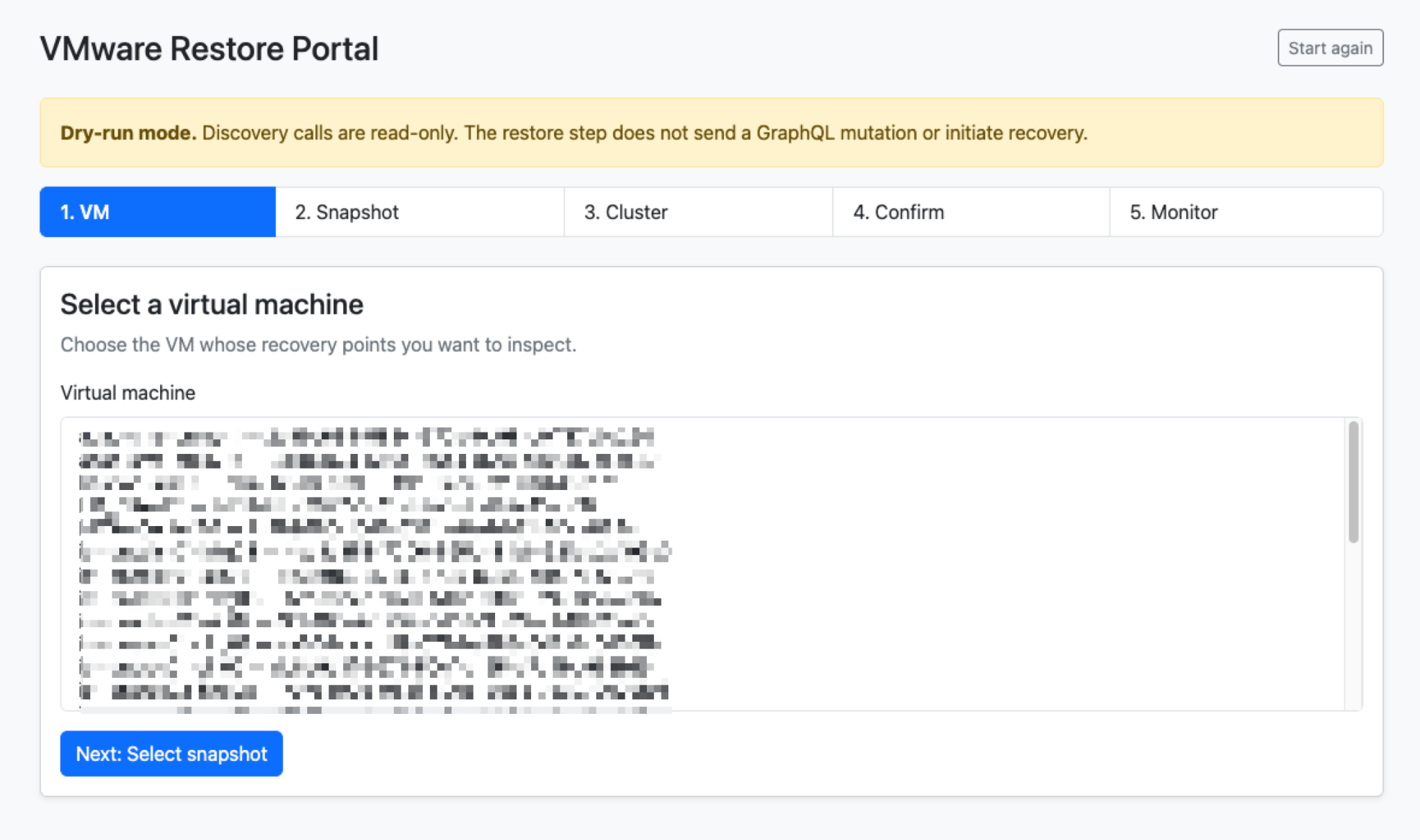
The portal uses one primary action per page. It is deliberately a small, server-side Bootstrap wizard. That keeps the operator focused on one decision at a time:
- The VM screen retrieves inventory through rkGetVsphereVMs().
- The snapshot screen retrieves recovery points through rkGetSnapshots().
- The cluster screen retrieves valid cluster UUIDs through rkGetClusters().
- The review screen requires explicit confirmation.
- The final screen displays the GraphQL preview or the asynchronous request status.
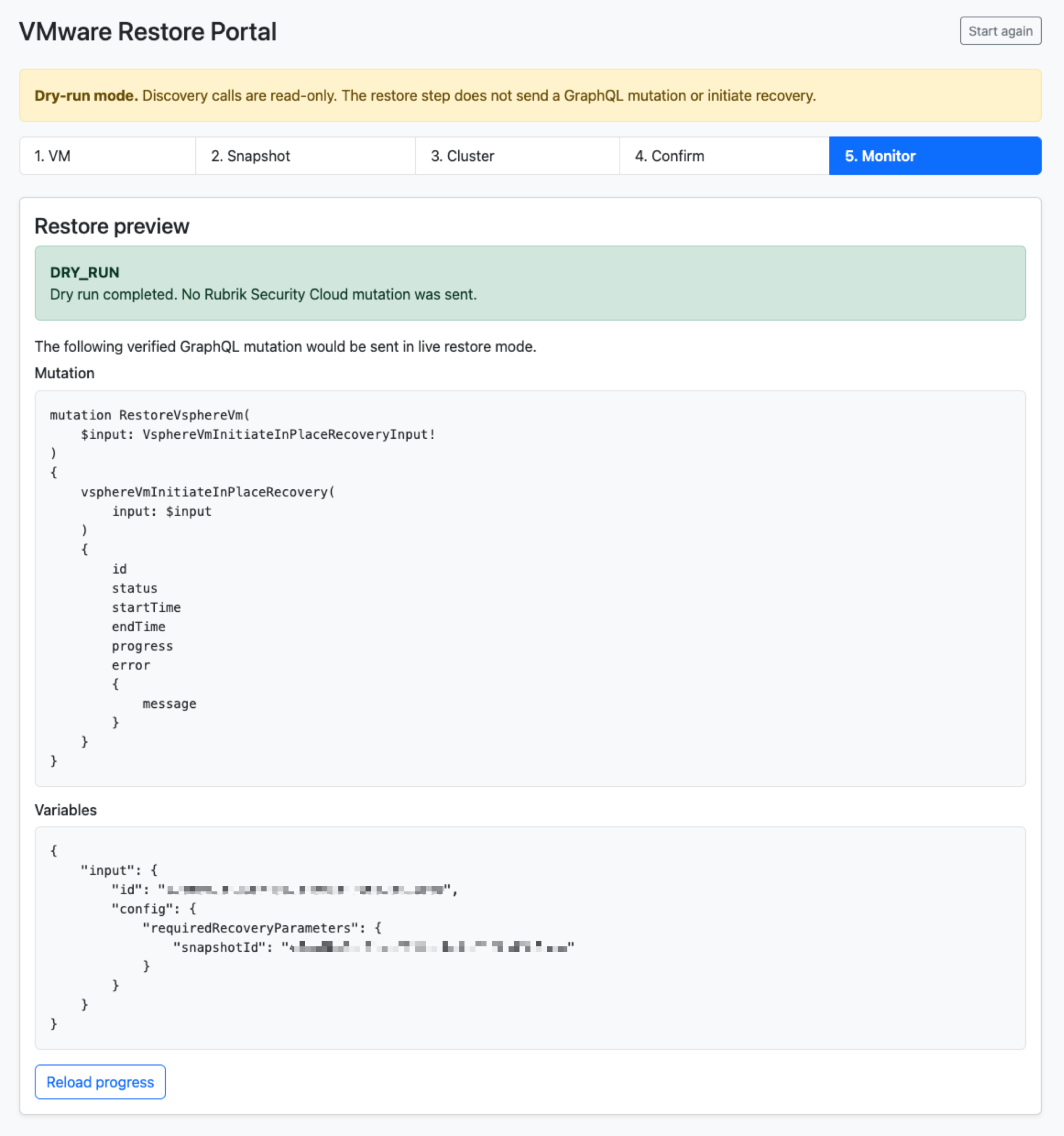
The selected VM, snapshot, and cluster are retained in the PHP session. Before preparing the restore, the portal asks RSC for the selected VM's snapshots again and confirms that the selected recovery point is still present.
This is a small but important check. A snapshot may expire or become unavailable between selection and submission.
Monitoring: Browser Versus CLI
Week 11 introduced two related helpers:
rkGetRequestStatus($requestId, $clusterUuid);and:
rkWaitForRequest($requestId, $clusterUuid, 5, 300);rkWaitForRequest() is intentionally blocking. It is a good fit for CLI tools, scheduled scripts, and workflows that must wait before moving to their next step.
The portal uses the other helper. In live mode, Reload progress performs one rkGetRequestStatus() lookup. The browser remains responsive because it does not keep a PHP request open in a polling loop.
The existing helper recognizes SUCCEEDED, FAILED, and CANCELED as terminal states. If rkWaitForRequest() reaches its own local limit first, it returns TIMEOUT. A monitoring timeout does not prove that the RSC operation failed; it means the local waiting period ended before a terminal status was observed.
In dry-run mode, there is intentionally no request ID and therefore no progress to retrieve.
From Functions to a Framework
If we had started by building this portal in Week 1, the application would probably contain authentication code, HTTP requests, GraphQL queries, pagination, response parsing, and error handling.
Instead, the application now asks the framework to perform operations such as:
rkGetVsphereVMs();
rkGetSnapshots();
rkGetClusters();
rkRestoreVm();
rkGetRequestStatus();
The complexity stays underneath. The application concentrates on the workflow.
This is probably the clearest demonstration in the series of why we spent so much time building small reusable pieces first.
Practitioner Tip "If your application needs to understand every detail of the API everywhere it uses the API, you probably do not have an abstraction layer yet. Keep the complexity in the framework and keep the application logic simple." |
RSC PHP Framework v2.0
The project now has a clear, reusable structure:
graphql-rsc/
├── config/
│ └── rsc-config.example.php
├── core/
│ ├── RscFramework.php
│ ├── rkGetClusters.php
│ ├── rkGetSnapshots.php
│ ├── rkGetVsphereVMs.php
│ ├── rkRequestStatus.php
│ └── rkRestoreVm.php
├── graphql/
├── examples/
├── web/
│ └── index.php
├── README.md
└── LICENSE
RscFramework.php is the canonical runtime. It centralizes configuration, OAuth2 authentication, token management, HTTP communication, GraphQL execution, and common error handling.
RscAuthentication.php remains a useful standalone reference from the earlier authentication work, but it should not be loaded together with RscFramework.php because the files define overlapping functions.
The framework also preserves the implementation lessons discovered along the way:
- client_id and client_secret are sent in the JSON POST body for /api/client_token.
- Tokens are cached in memory for the lifetime of the PHP process.
- cURL handles are released with unset($curl).
- HTTP failures, invalid JSON, and GraphQL errors are raised as exceptions by the shared runtime.
What v2.0 Delivers
RSC PHP Framework v2.0 now provides reusable building blocks to:
- Authenticate with Rubrik Security Cloud.
- Execute GraphQL queries and mutations.
- Handle GraphQL, HTTP, JSON, and cURL failures consistently.
- Retrieve VMware inventory, snapshots, and Rubrik cluster inventory.
- Trigger on-demand VMware snapshots.
- Monitor asynchronous VMware operations.
- Prepare and inspect a VMware in-place recovery request.
- Submit that recovery only when the dry run is explicitly disabled.
- Present the workflow through a small, practical browser interface.
That is quite a long way from the first authentication request.
Deployment and Security Notes
The Restore Portal requires PHP 8.1 or later and PHP cURL. It has no Composer dependencies.
Copy the public example configuration before using the framework:
cp config/rsc-config.example.php config/rsc-config.phpConfigure rsc_url, client_id, and client_secret, then leave restore_dry_run as true until you have completed a safe test.
Only web/ should be exposed through the PHP web server. Keep config/, core/, and graphql/ outside the document root. Never commit config/rsc-config.php, secret.json, or any other credential file to GitHub.
For local testing:
php -S localhost:8080 -t webThen open http://localhost:8080.
The current portal implements server-side CSRF checks, explicit confirmation, selected-object validation, session cookies with HttpOnly and SameSite=Strict, and HTML output escaping.
It is still demonstration code, not a complete production recovery service. Before exposing it beyond a trusted administrative environment, add your organization's authentication and authorization layer, centralized audit logging, rate limiting, stronger session management, and repeat-submission protection. The exact minimum RSC permissions must also be validated for the service account in the target tenant.
Did We Deliver What We Promised?
I went back to the original Week 1 article while preparing this final post. At the time, I imagined three examples of what the new framework could eventually enable.
A Compliance Dashboard
We did not build a complete visual dashboard, but we built much of what would sit underneath it: SLA information, protection status, snapshot statistics, and recovery-point history.
A Snapshot and Restore Portal
This one became real: Week 9 delivered the Backup Snapshot Explorer, and Week 12 completes the other half with the interactive VMware Restore Portal.
A CLI Automation Toolkit
Throughout the series, we created reusable rk*() helpers and command-line examples capable of querying RSC, triggering operations, and monitoring them.
So did everything turn out exactly as imagined in Week 1?
No.
Projects rarely do.
But I think we ended up with something more useful: the common framework underneath all of those ideas. The Snapshot Explorer and Restore Portal are two very different applications consuming the same foundation.
And that was the real objective from the beginning.
Releasing v2.0
The GitHub repository contains the files intended for public publication, without local credentials or configuration.
After reviewing that package and completing a non-production live-recovery test, create the release tag:
git add .
git commit -m "Release RSC PHP Framework v2.0"
git tag -a v2.0.0 -m "RSC PHP Framework v2.0"
git push origin main
git push origin v2.0.0
The v2.0.0 tag should be created only after that review and validation. Until then, the repository is the active development source rather than a fixed release reference.
Where Could It Go Next?
Version 2.0 does not mean there is nothing left to build.
There are many obvious directions: SaaS protection, Microsoft SQL Server, additional database workloads, file search, file-level recovery, richer recovery workflows, dashboards, scheduled reporting, and integration with external automation platforms.
Maybe one day that Compliance Dashboard from Week 1 will become a project of its own. But those are stories for another day.
The objective here was not to implement everything Rubrik Security Cloud can do. It was to build a foundation that makes those next projects possible.
And I think we have done that. Along the way, we also had the opportunity to learn and explore how GraphQL really works, something that, for me, has been just as valuable as the framework itself.
Twelve Weeks... Sort Of
When I started this project, the plan sounded simple.
Twelve topics. Twelve articles. One article every week.
What could possibly go wrong?
Well... reality.
Writing a technical article while simultaneously developing what the article describes is an interesting challenge. You cannot simply write that something works. You have to make it work.
Queries need testing. Responses need understanding. Functions need writing. Assumptions sometimes turn out to be wrong.
And occasionally, something discovered several weeks later makes you look back at an earlier decision and think: "I could have done that differently."
Then there are screenshots, GitHub examples, reviews, corrections, and publishing. And, of course, normal work and normal life happening at exactly the same time.
There were weeks when I was on schedule. There were weeks when I was not. There were pauses and delays.
So no, this was not twelve perfectly synchronized weeks.
And I am actually fine with that.
Because building things rarely follows the plan you draw before you start.
What matters is continuing to solve the next problem, and eventually reaching the objective.
A Word of Thanks
There is one person I particularly want to thank before closing this series: my buddy, Mike Preston.
Mike has been part of this journey from the beginning, providing technical insight, feedback, ideas, reviews, and the occasional challenge to the way I was approaching something.
His input became sufficiently regular that it eventually turned into something readers of the series will recognize immediately: Mike's Advice.
Those little sections represent something I strongly believe makes technical projects better: having someone willing to look at what you are doing from another perspective and ask: "Have you thought about this?"
So, thank you Mike for the support, the feedback, the ideas, and for being along for the ride.
I also want to give a huge thank you to the Rubrik Practitioner Advocacy Manager, who helped make all of this possible.
There Is No Week 13
Twelve articles ago, we started with a question: how can we rebuild a PHP framework for Rubrik Security Cloud and GraphQL?
We started with authentication. Then came GraphQL, reusable functions, workload discovery, protection information, snapshots, reporting, mutations, and monitoring. And finally, a restore workflow that brings those capabilities together.
Some things worked immediately. Others required considerably more investigation. Some assumptions survived the complete series. Others did not.
But perhaps that is a better representation of engineering than a perfectly linear tutorial could ever be.
You build. You test. You discover. You correct. You improve. And you keep going.
Normally, this is where I would finish with: Looking Ahead: Week 13.
Not this time.
Contributed by
Frederic Lhoest
Senior Technology Architect, PCCW Global

Mike Preston
Staff Technical Marketing Manager, Rubrik


